KR
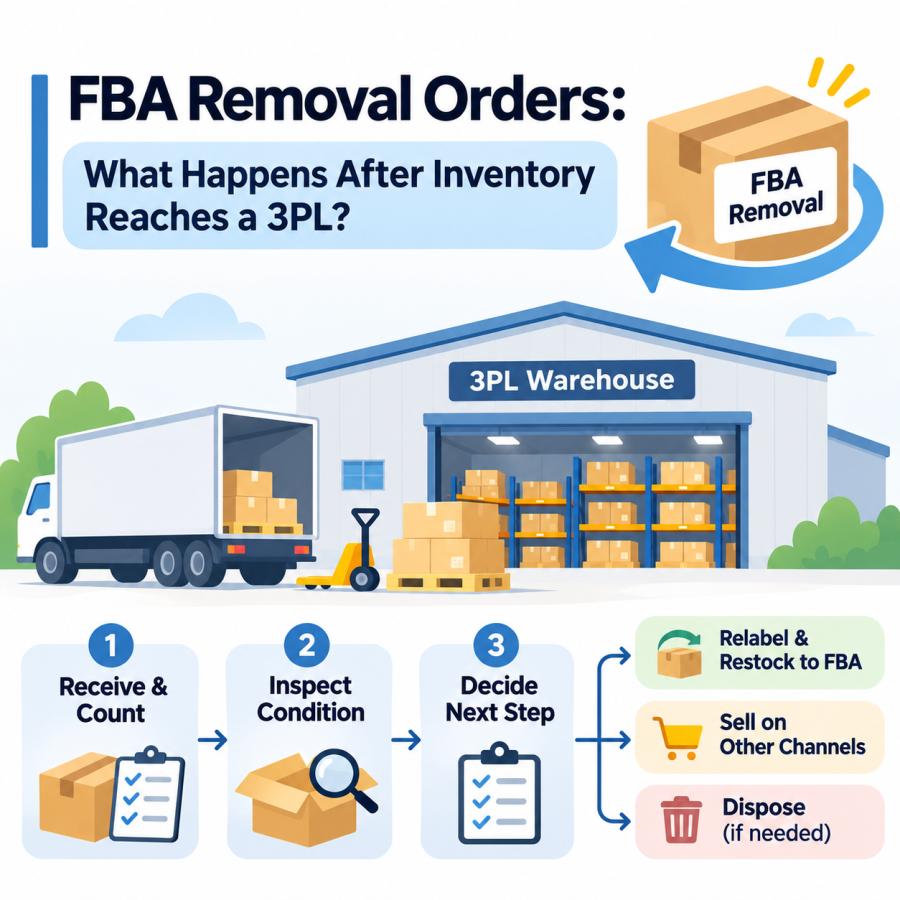
When Amazon ships your inventory back to you, the removal order is only half finished. The units still need to be received, counted, inspected, and sent somewhere useful. Without a plan, removed inventory ends up stacked in a corner, unsorted, with no record of what came back or why.
This guide explains what happens to an Amazon FBA removal order after it reaches a 3PL warehouse: how to track it, how to reconcile quantities, how to check condition, and how to decide whether each unit goes back to Amazon, to another channel, or to disposal. It focuses on the work after removal, not on general FBA prep.
What Is an Amazon FBA Removal Order?
A removal order is a request for Amazon to either return units from its fulfillment network to an address you choose or dispose of them. Sellers create removal orders for slow-moving, aging, seasonal, or damaged stock. Amazon can also trigger removals in some cases, such as automated removals for certain unfulfillable units, or required removals that carry a deadline to act.
Two points matter for what happens next:
- Return versus disposal. If you choose return, the units ship to the recipient address on the order, which can be a 3PL. If you choose disposal, Amazon destroys the units, and disposal fees apply.
- Settings matter. Automated removal settings can determine whether eligible inventory is returned to a designated address or disposed of. Required removal notices may include a deadline for seller action, so check the specific notice and current Seller Central requirements rather than assuming a standard response period. Unexpected disposals are expensive, so review your settings regularly.
Removal and disposal fees are, per Amazon’s announcement, charged per unit as each unit is processed for orders created on or after March 1, 2026. Rates were not changed by that announcement.
Step 1: Track the Removal Shipment Before It Arrives
A removal order does not arrive all at once, and it does not arrive on a schedule you control. Amazon staff have noted that processing can take a long time, in some cases 90 days or more, and that tracking numbers appear only after the removal has been processed.
To track a removal shipment, sellers can check the Removal Order Detail report in Seller Central for available tracking information. Amazon staff have described one path (Reports > Fulfillment > Removal Order Detail, then View all shipped units) in a Seller Central thread on removal tracking. Depending on the carrier and shipment type, delivery may occur without a separately arranged appointment, so share tracking details with your 3PL as soon as they become available.
Before units arrive, give your 3PL:
- The removal order ID and expected SKUs and quantities
- The tracking numbers as they become available
- A named contact, in case the carrier needs to coordinate delivery
- Instructions for what to do with each SKU once received (return to stock, review, or dispose)
A single removal order can arrive in several pieces, split across cartons, pallets, or shipments. Treat each arrival as its own receiving event.
Step 2: Receive the Shipment and Reconcile Quantities
At the dock, the first job is to compare what arrived against what the removal order says should have shipped.
- Count cartons or pallets against the carrier paperwork and note any shortage or visible damage on the delivery receipt before the driver leaves.
- Match tracking numbers to the removal order detail report.
- Count units by SKU and compare them to the shipped quantities on the report.
- Record differences. Shortages, overages, and wrong items should be documented the day they are found.
- Keep removal shipments separate from regular inbound inventory until they are inspected, so unverified units do not enter sellable stock.
A documented receiving count is an important part of any discrepancy investigation. Combined with tracking records, delivery receipts, and photos, it can help establish what was received and support a potential claim.
Step 3: Inspect Condition: Exterior, Seal, and Contents
Removed inventory is not the same as new inventory. Units may have been handled, returned by customers, or stored for months. A practical inspection covers:
- Exterior condition. Crushed, wet, or torn outer packaging.
- Open or sealed. Whether the retail package is still sealed, or has been opened, resealed, or taped.
- Contents. Missing accessories, missing components, or the wrong item inside.
- Visible wear or use. Scratches, stains, odor, or signs of use.
- Labels. Whether the FNSKU label is intact, damaged, or no longer matches the listing.
- Expiration or date codes, for products where those apply.
Photographing a sample of damaged or questionable units, along with the carton and shipping label, makes later decisions and claims easier. Photo documentation is not automatic at every 3PL, so agree on it in advance, including how many photos and for which categories of units.
Step 4: Decide the Disposition: Restock, Repack, Relabel, or Dispose
Once inspected, each unit needs a decision. A simple, consistent set of categories works well:
- Sellable as received. Sealed, undamaged, and complete. These can go back into inventory once labels are verified.
- Needs repackaging. The product is fine, but the outer packaging or polybag is damaged. It may be repackaged, subject to your product and Amazon’s condition rules.
- Needs relabeling. The barcode is missing, damaged, or no longer correct. The label is replaced or the conflicting barcode is covered, following Amazon’s current labeling requirements.
- Needs review. Opened, used, incomplete, or uncertain units that require a decision from you.
- Dispose. Damaged, expired, unsafe, or not worth the cost of repair, with the reason recorded.
Whether a unit can be listed as new again depends on its condition and on Amazon’s product condition requirements, so apply your own grading criteria carefully, and do not assume that every unit that came back in a box is sellable. For businesses that handle returns and removals regularly, a defined grade scale keeps decisions consistent from one shift to the next.
Step 5: Re-Ship to Amazon, Move to Another Channel, or Dispose
After disposition, units go one of three ways.
Back to Amazon. Sellable units can be re-inbounded through a new shipment plan. They have to meet the same prep and labeling requirements as any other FBA inventory, including correct barcodes, packaging, and carton and pallet preparation. Our guide to Amazon FBA prep covers what that involves.
To another channel. Some brands sell removed units on their own website, a marketplace other than Amazon, or through wholesale or discount channels, when the product condition and channel policies allow it. Since stock at your own warehouse can serve more than one sales channel, this can recover value that would otherwise be lost.
Disposal. Units that cannot be sold should be disposed of with records kept, including quantity, reason, and date, for your accounting and inventory reconciliation. Ask your 3PL what disposal options it offers and what documentation it provides, since some brands also evaluate liquidation or donation depending on the product.
When Something Doesn’t Add Up: Missing or Damaged Removal Shipments
If a shipment is short, damaged, or contains the wrong items, speed matters. Amazon sets claim windows for removal-related reimbursement, and those windows have changed more than once. As of Amazon’s announcement effective October 15, 2025, windows included 15 to 135 days after shipment creation for lost removal orders, 120 days from delivery for damaged removal orders, and 120 days from the date the item was removed from Amazon’s fulfillment network for removal order grading, as described in Amazon’s announcement on reimbursement claim windows. Confirm the current windows in the FBA inventory reimbursement policy rather than relying on a figure from an article.
Amazon staff have also noted that reimbursement applies only in specific cases. For example, items that were pending disposal, defective, or damaged by a customer may not qualify. This is one reason to record the condition and reason for every problem unit.
Useful evidence for a claim typically includes:
- The removal order ID and tracking numbers
- The delivery receipt with any exceptions noted at the time
- A receiving count by SKU compared with the shipped quantity
- Photos of cartons, labels, and affected units
- The 3PL’s receiving record, with dates
Practical Checklist
- Confirm removal order IDs, SKUs, and expected quantities before shipments arrive.
- Share tracking numbers and a delivery contact with your 3PL.
- Note carton and pallet exceptions on the delivery receipt.
- Count by SKU and compare against the removal order detail report.
- Keep removed units separate until inspected.
- Inspect packaging, seal status, contents, labels, and date codes.
- Record disposition and reason for each unit or group of units.
- Document problem units with photos, by agreement with your 3PL.
- Relabel or repack only according to current Amazon requirements.
- Decide in advance whether sellable units return to FBA or go to another channel.
- Track claim deadlines from the day each shipment is created or delivered.
- Review your automated removal settings and return address regularly.
Key Takeaway
A removal order is not finished when the carton arrives. What the warehouse does in the first few days, counting, inspecting, grading, and documenting, determines whether units can be restocked, how much value is recovered, and whether you can support a claim when something is missing. Clear instructions before arrival and a simple disposition process save more than any single step on its own.
PNP LINE supports Amazon FBA removal shipments with warehouse receiving, inventory management, and relabeling or repacking services upon request. Inspection, condition documentation, and other special handling services can be arranged based on the customer’s requirements and the warehouse’s available capabilities. Learn more about our Amazon FBA prep and returns and reverse logistics services.
📋 Request an Online Quote https://www.pnpline.com
Source References
- Amazon Seller Central Forums, “Removal Orders Tracking Numbers?” (reply from Amazon staff on Removal Order Detail report and carrier delivery) — https://sellercentral.amazon.com/seller-forums/discussions/t/8c82b53a-5b64-4cf1-89bc-967a7d9abb48
- Amazon Seller Central Forums, “FBA Removal Orders: What Triggers Destruction and How to Avoid It” (staff-attributed post on automated and required removals) — https://sellercentral.amazon.com/seller-forums/discussions/t/d16c5413-df01-430b-b5f8-f270bbbc9057
- Amazon Seller Central Forums, “FBA removal and disposal fees to be charged as units are processed” (News and Announcements, January 29, 2026; effective March 1, 2026) — https://sellercentral.amazon.com/seller-forums/discussions/t/2f4edad8-31d4-443b-8b22-12776c4f685a
- Amazon Seller Central Forums, “Update to FBA inventory reimbursement claim windows” (effective October 15, 2025) — https://sellercentral.amazon.com/seller-forums/discussions/t/d8f9a56c-882f-437c-ad34-cccd11cfa465
- Amazon Seller Central Forums, “Removal Order Reimbursement” (reply from Amazon staff on reimbursement eligibility) — https://sellercentral.amazon.com/seller-forums/discussions/t/b3bb247e-1d58-45c7-bd84-a9196edd6fbf
Disclaimer: Amazon’s removal order procedures, fees, reimbursement policies, claim windows, labeling rules, and product condition requirements change frequently and can vary by seller account, product category, and marketplace. This article is provided for general informational purposes and does not constitute legal, tax, or Amazon-policy advice. Sellers should confirm current requirements in Seller Central before creating removal orders, filing claims, or re-inbounding inventory.
#Amazon FBA removal order 3PL, #FBA removal order receiving, #Amazon removal shipment inspection, #FBA removal order relabel restock, #Amazon removal order tracking, #FBA returned inventory warehouse